
Are You Drowning in Fitness Data? Here’s How to Fix It
Declutter fitness tracker data by following these core steps:
- Delete old or inaccurate logs from your device’s companion app (Apple Health, Fitbit, Garmin Connect, Samsung Health, or Google Fit)
- Keep only the metrics that matter to your actual goals — steps, sleep, or heart rate, not all of the above
- Use an aggregation tool like FitnessSyncer to unify data from multiple devices into one clean view
- Consider a minimal tracking system — even a simple workout journal — to avoid future data buildup
- Review your privacy settings to control what data is collected and synced going forward
You strap on your fitness tracker with the best intentions. Then, a few months later, you’re staring at years of step counts, sleep scores, calorie estimates, body fat readings, and heart rate graphs — most of which you’ve never acted on.
Sound familiar?
One writer described it perfectly after a month of hyper-tracking: the data made them more consistent at the gym and helped them walk more — but it also pulled them “a little too into the numbers game,” requiring a conscious step back to refocus on how they actually felt.
That’s the trap. More data doesn’t always mean better health. It often just means more noise.
This guide will show you exactly how to cut through that noise — deleting what you don’t need, keeping what actually helps, and building a simpler system that works for you long-term.
The Hidden Risks of Data Hoarding
We live in an era where we can track everything from our blood oxygen levels to the exact second we entered REM sleep. But just because we can track it doesn’t mean we should store it forever. Data hoarding in the fitness world carries hidden costs that go beyond just a cluttered app interface.
First, there are significant privacy concerns. Every data point—your GPS routes, your heart rate during stressful moments, your sleep patterns—is stored in a cloud somewhere. If you aren’t using that data to improve your health, you are essentially maintaining a digital footprint of your most intimate biological functions for no reason. When you declutter fitness tracker data, you reduce your “attack surface” and regain control over your personal information. This is a vital part of digital-decluttering-a-comprehensive-guide.
Then there is the psychological toll. Constant tracking can lead to “metric madness,” where we value the number on the screen over our physical reality. We’ve all felt that pang of guilt when our watch tells us we haven’t “closed our rings,” even if we just finished a grueling day of physical labor. This gamification can be a double-edged sword; it motivates us initially, but it can quickly turn into a trap where we chase rewards rather than health.
Furthermore, much of this data is surprisingly inaccurate. Scientific research on smart scale inaccuracy suggests that wearable devices and smart scales often provide “sketchy” data regarding body composition and calorie burn. Relying on flawed data to make health decisions is not just frustrating—it’s counterproductive.
Why You Should Declutter Fitness Tracker Data for Mental Clarity
Obsessive logging can zap the joy out of living. Imagine eating a single piece of chocolate at a holiday party and feeling the immediate urge to log those 72 calories. That isn’t health; that’s an obsession that steals the “fun” from life’s moments.
In a four-week experiment, one user found that while tracking led to more gym visits, it also caused them to become hyper-focused on daily weight fluctuations. Our weight can change by several pounds in a single day due to hydration, salt intake, or hormones. If your app is cluttered with every single daily weigh-in, you might lose sight of the long-term trend and spiral into negativity.
By choosing to declutter fitness tracker data, you clear the mental fog. You shift your focus from “What do the numbers say?” to “How do I feel?” This transition is essential for maintaining how-to-reduce-digital-clutter-in-cloud.
How to Delete and Declutter Fitness Tracker Data Across Major Platforms
Ready to clean house? Most fitness data isn’t actually stored on your watch; it lives in the companion app on your phone. To truly declutter fitness tracker data, you need to dive into the settings of these ecosystems.
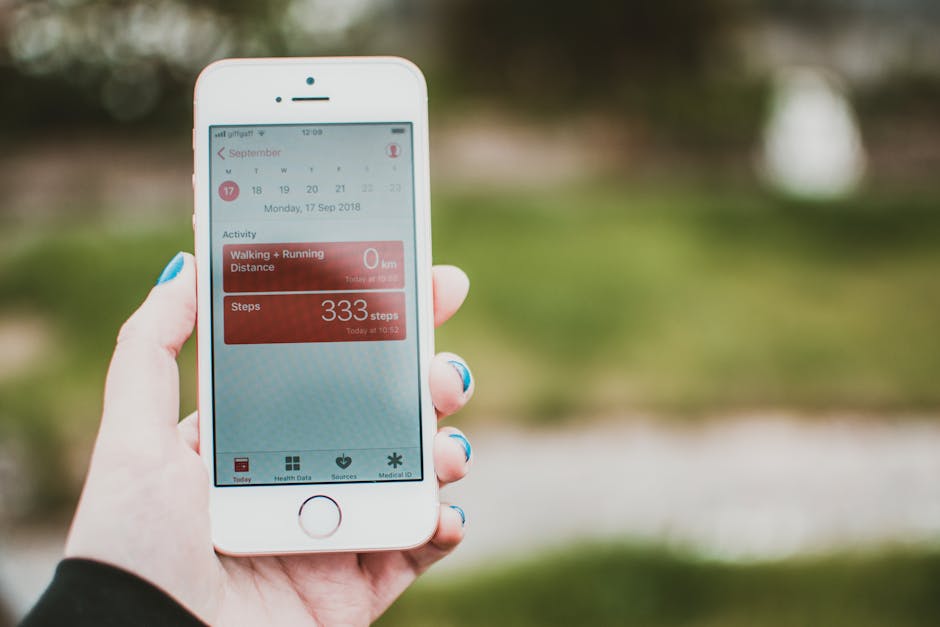
Here is how to handle the “Big Four”:
- Apple Watch: Everything is managed via the Health app on your iPhone. You don’t delete data on the watch itself; you do it by browsing to specific categories (like Workouts or Sleep), selecting “Show All Data,” and swiping left to delete.
- Fitbit: You can delete specific exercises or sleep logs by tapping the tile in the app, hitting the three dots, and selecting “Delete.” Interestingly, Fitbit doesn’t let you “delete” steps directly, but you can override them by logging a “non-walking” activity (like driving) over that time period.
- Garmin Connect: Navigate to “Activities” > “All Activities.” From there, you can select individual sessions and use the three-dot menu to “Delete Activity.”
- Samsung Health: Go to the specific metric (like Sleep or Exercise) on the Home tab, select the entry, and tap the three dots to delete.
For more detailed steps on specific brands, check out How To Delete the Data Your Smartwatch or Fitness Tracker Has on You.
Step-by-Step: Declutter Fitness Tracker Data in Apple Health and Google Fit
If you use an iPhone or Android, your phone is likely acting as a “hub” for all your health data. This can lead to massive duplication if you have multiple apps (like Strava, MyFitnessPal, and a smart scale app) all feeding into one place.
For Google Fit (Android):
- Open the Google Fit app.
- Tap Profile > Settings > Manage your data.
- You can choose to “Delete all” or tap “Delete” next to specific types (like location or guided breathing).
- Note: Once you Delete your data from Google Fit, it is gone forever. It won’t necessarily delete the data from the source app (like Fitbit), so you may need to follow how-to-declutter-multiple-devices-a-step-by-step-guide for a total clean-up.
For Apple Health (iOS):
- Open the Health app and tap the Browse tab.
- Select a category (e.g., Vitals or Activity).
- Scroll to the bottom and tap Show All Data.
- Tap Edit in the top right to delete specific entries or “Delete All.”
Managing Granular Deletions for Fitbit and Garmin
Sometimes you don’t want to wipe everything; you just want to fix the “clutter” caused by errors. For example, if your Fitbit recorded 2,000 steps while you were actually just driving on a bumpy road, that’s “junk data.”
In the Fitbit app, you can manage “Active Zone Minutes” and “Steps” by going to the specific tile and using the “Manage Data” option. You can also delete body temperature logs or snore detection data if those metrics aren’t serving your goals. More info about Fitbit data management can help you navigate these menus.
Garmin users often find their “Wellness Data” (like stress and body battery) becomes overwhelming. While Garmin offers less granular control over these specific background metrics compared to activities, you can always delete the associated activities to clean up your training load history.
Streamlining Your Stats with Aggregation Tools
If you use a Garmin for running, an Apple Watch for daily wear, and a smart scale for weight, your data is scattered across three different “clouds.” This fragmentation makes it impossible to see the big picture without feeling overwhelmed.
| Feature | Manual Tracking | Digital Aggregation (Apps) |
|---|---|---|
| Speed | Slow (60+ seconds) | Instant |
| Accuracy | High (User-verified) | Variable (Sensor-dependent) |
| Decluttering | Easy (Rip out a page) | Complex (Menu diving) |
| Analysis | Intuitive | Automated/Visual |
Tools like FitnessSyncer or Health Data Export act as a “sieve” for your data. FitnessSyncer supports over 50 health and fitness providers (including Strava, Garmin, and Apple Health), allowing you to unify everything into one dashboard. Meanwhile, the Health Data Export app has helped users export over 100k data points into simple CSV or Google Sheets files.
By moving your data into a spreadsheet, you can perform a “bulk clean-up.” It’s much easier to see duplicate entries in a row-and-column format than it is in a flashy mobile app. This is a great way to start how-to-clean-up-cloud-storage.
Unifying Multi-Device Data for a Cleaner View
The goal of using a tool like FitnessSyncer isn’t to add more data, but to view it more clearly. Their “Daily Analyzer” gives you a minute-by-minute view of your day, which can help you spot patterns—like how a late-night snack affects your sleep—without needing to check five different apps.
You can also use these tools to track “equipment wear.” For example, if you sync your running shoes to your data, the app can tell you when they’ve hit 300 miles and need replacing. This is “useful” data, unlike the “noise” of how many floors you climbed while taking the elevator. Cleaning up these digital duplicates is similar to removing-duplicate-files-a-quick-tutorial.
Beyond the Screen: Adopting a Minimalist Tracking System
What if the best way to declutter fitness tracker data is to stop generating so much of it?
Many fitness experts are returning to low-tech solutions. James Clear, the author of Atomic Habits, uses a workout journal system that takes less than 60 seconds to plan. Instead of a watch telling you that you burned 300 calories (which is likely an estimate), you record the date, your body weight, the exercise, and the sets/reps.
This manual method forces you to focus on Progressive Overload—the actual driver of fitness—rather than “closing rings.” It’s versatile, quick, and creates zero digital clutter. If you’re looking for a fresh start, use this cloud-decluttering-checklist to see what you can move offline.
Lessons from Personal Experiments in Simplified Tracking
We’ve found that the most successful “trackers” are those who treat data as “breadcrumbs” rather than the destination. One experiment showed that logging dance classes in a simple Google Sheet—noting just the time and “how it went”—was more effective for long-term consistency than wearing a chest-strap heart rate monitor.
When you simplify, you start to notice things the sensors miss. You might notice that you feel stronger on days you sleep 7 hours versus 8, regardless of what your “Sleep Score” says. More info about workout journaling shows that manual logging helps make the workout process “mindless and automatic,” allowing you to focus on the effort, not the interface.
Frequently Asked Questions
Can I delete specific metrics like steps without wiping my whole history?
Yes, but it depends on the platform. In Apple Health and Google Fit, you can go into the specific category and delete individual data points. On Fitbit, you can’t “delete” steps, but you can log a “Driving” activity over the time period to zero them out.
Does deleting data from Google Fit remove it from my connected Garmin or Fitbit account?
No. Google Fit acts as a destination. Deleting the data from the “hub” does not delete it from the “source.” You must go into your Garmin or Fitbit account separately to remove the data from their servers.
Is it possible to recover fitness data once it has been deleted?
Generally, no. Most platforms like Google Fit and Apple Health warn you that deletion is permanent. If you think you might want the data later for a doctor or trainer, use an export tool to save a CSV file before you hit the “Delete All” button.
Conclusion
At Dinheiro Bom, we believe that a “good life” (the literal translation of our name!) requires balance. That balance is often disrupted by an avalanche of unnecessary information.
To declutter fitness tracker data is to reclaim your time and your mental space. By deleting inaccurate logs, focusing on meaningful metrics like progressive overload, and perhaps even moving back to a simple paper journal, you move away from “Metric Madness” and toward genuine well-being.
Remember: you are not a machine, and your health is not a math problem to be solved. Use the data as a tool, but never let it become the master. For more tips on simplifying your digital life, revisit our digital-decluttering-a-comprehensive-guide.
